The purpose of this project is automatically turn on the sleep timer of the television.
Story: My wife is an insomniac and stays up late every night watching TV. She eventually falls asleep and leaves the TV on. She NEVER remembers to set the sleep timer, plus the TiVo remote doesn't allow setting the TV sleep timer, and who knows where the original TV remote is most of the time. We have DirecTV, and about 3 or 4 in the morning they do a download. The TV goes black and quiet for a while, then comes back to life when the download is done. This wakes me up every night and i have to get out of bed and turn off the TV because my wife as fallen asleep and lost the remote in the bed somewhere. Arrrgh!
How it works: Based on an Arduino board, it has an IR receiver ripped from an old broken TV, and an IR diode from a remote from a TV we don't have anymore. The device sits on the TV stand, directly in front of the TV. When it detects IR traffic from the remote, it keeps resetting a timer. If the timer expires, it assumes that the user has fallen asleep and is no longer controlling the TV. The device then sends a remote control to the TV to set the sleep timer. If the user doesn't notice (they are likely asleep), the sleep timer counts down and shuts off the TV. You might ask why don't I just send a power command? Problem is I can't really be sure the TV is on or off. What if she actually turned the TV off before falling asleep. It would be a disaster to have the device turn ON the TV. Using the sleep timer is the perfect fail safe. If the TV is off, the sleep command does nothing . If the TV is on, it will count down and turn off. Just takes a little longer than turning it off directly.
We have a SONY Bravia TV and use a DirecTV TiVo box primarily. This works for those devices. You will have to modify for your devices.

Arduino TV IR sleeper
The project is constructed of:
- Arduino Duemilanove, $25-30, bought this one from http://www.sparkfun.com/commerce/product_info.php?products_id=666
- Protoshield Board $6 http://www.adafruit.com/index.php?main_page=product_info&cPath=17_21&products_id=55 . I just got the board because i had some pin headers laying around. You can always get these http://www.adafruit.com/index.php?main_page=product_info&cPath=17_21&products_id=85 while you are at it if you don't have any. I like this kit for $12.50 that will give you the board, LEDs, headers, and a reset switch. http://www.adafruit.com/index.php?main_page=product_info&cPath=17_21&products_id=51
- Yellow and Green LEDs, and 2K resistors. Used larger resistors so the LEDs weren't so bright at night in the bedroom
- IR LED and 200 ohm resistor. I broke open an old IR remote control and un-soldered it. I'm sure you can buy one if you have to. Radio shack has http://www.radioshack.com/search/index.jsp?kwCatId=&kw=ir%20diode&origkw=ir%20diode&sr=1
- IR Receiver. I scrounged this from an old broken TV set. You can even get these at Radio Shack http://www.radioshack.com/product/index.jsp?productId=2049727 for $4.
- Software - based it on this IR remote library, which is far and above the best one on the web. http://www.arcfn.com/2009/08/multi-protocol-infrared-remote-library.html
- A 9V AC adapter. I used one from a broken router, needs to be 500mA and 9V. You can use up to 12V, but it can make the Arduino hot. I've used adapters down to 6V, and they have been fine too.
Connections:
The IR receivers have three pins. Signal, Gnd, 5V. I attached it to pin 9
int RECV_PIN = 9; //IR detector module attached here
int led_green = 11; //led to indicate TV on & IR activity flickers green. Connect the same way as the IR diode, but use a 2.2K resistor in series instead
int led_yellow = 13; //led to indicated TV user is drowsy. Same as led_green.
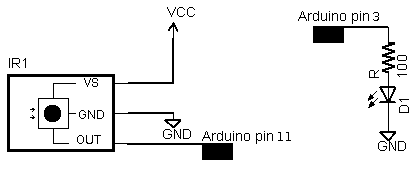
thanks to http://www.arcfn.com/2009/08/multi-protocol-infrared-remote-library.html for this drawing
I used the prototype shield, which is probably overkill but made a nice compact unit. I bent the receiver and yellow/green LEDs so they pointed towards the user. The IR tx diode is mounted on the back edge and points towards the TV. I put on a reset switch because it is always nice to have a wave to recover.
This project proved way more difficult than i expected. The device is both a reciever and a transmitter, and needed to detect IR transmission as an interrupt because I was running a timer from last activity. Combining these three functions was tricky. There was an IR library on Arduino playground http://www.arduino.cc/cgi-bin/yabb2/YaBB.pl?num=1176098434 , that was based on delay(),. The receiver worked just fine, but the transmitter failed to control the TV. I experimented for hours and finally discovered that the timing of the bits in the Arduino were off. I had to set the times much shorter than the spec, because the Arduino was timer and interrupts were slowing things down. In the process of debugging and googling help, the http://www.arcfn.com/2009/08/multi-protocol-infrared-remote-library.html library bubbled up through google and i downloaded it. This is much more solid and uses the PWM as the timing reference for transmit, so the TV liked it. Luckily it supports the same devices that I had in my home, so I used it almost unmodified. I had further troubles with the sending routine stopping the receiving routine, which the author admits to in his blog comments. All you have to do is restart the receiver after you have transmitted. I had further troubles with ambient IR triggering the receiver, and had to add a code filter to ignore anything that doesn't match a valid IR code from either the TiVo (NEC codes) or Sony.
So here is the code I ended up with. you need to download the IR library and put it in your libraries folder.
This code has debugging to the serial monitor included, which helps you understand what is happening.
Code follows....
